
Here is a very good ebook about "Mokok ( Mogok ) Sayadaw's Biography and Meditation" that I found online. I hope you will appreciate the book. Click the picture below to download the book.
For those who are looking for online English - Myanmar Dictionary, here are the sites I found quite useful. They are not complete but I reckon they have done a great job.
- English Myanmar Dictionary (All Channel) (To download software, visit here)
- Planet Dictionary
- Ayinepan Dictionary
- English Burmese English Dictionary
- English Myanmar Translator & Dictionary Software
Please share with me if you know any other good sites too. Thanks!!! Read More......
A few days ago, my PC got infected with a Trojan Horse. It kind of bypassed Trend Micro Officescan. Trend Micro could only detect and block the internet access for the Trojan, but it didn't remove the virus.
So I downloaded AVG Anti-Virus Free version and scanned the PC. AVG detected the virus (Trojan Horse PSW.Agent.7.L , a type of Win32 Trojan W32.Popwin by Symantec Norton's term, in the form of auto.exe) in all partitions and USB drives too, and it removed them. However, I had to remove other associated files and fix the registry settings manually. It took me many hours to remove it.
The symptoms of the Trojan are:
- A pop up might show up unusually from a pop-up free site such as Google.
- A warning message asking you to install a spyware detection tool might come up.
- If you check the process list by pressing Ctrl + Alt + Delete, you will see a process with 8 random character name.
- When you right-click your hard drives, the first item you see is "Auto" instead of "Open".
- You cannot view hidden files by changing the settings from Tools >> Folder Options >> View >> check "Show hidden files and folders". It will go back to "Do not show hidden files and folders" option as soon as you close the Folder Options.
The steps to remove the Trojan are:
- Download and install AVG Anti-Virus for Free.
- Scan your pc including all partitions/drives/USB keys. That will delete the viruses including auto.exe , and will solve the symptoms 1-3. You need to fix the rest of the symptoms manually. If you click on C:\ drive "Choose Program" dialogue box will appear instead of opening the drive.
- From Start >> Run >> type regedit. Go to HKEY_LOCAL_MACHINE\SOFTWARE\Microsoft\Windows\CurrentVersion\Explorer\Advanced\Folder\Hidden\SHOWALL and right-click on CheckedValue and choose Modify. Change the value to 1 (it may be set by the virus to 2).
- Now you should be able to view hidden files by changing the settings from Tools >> Folder Options >> View >> check "Show hidden files and folders".
- Go to C:\ drive by right-click >> Explore. Delete autorun.inf. Repeat it for all other drives.
- Alternatively you can run command prompt and go to C:\ drive. Then type "attrib" without the quotes. Then you will find autorun.inf and can remove it.
Now your PC should be free from the Trojan. Anyway, prevention is better than cure so make sure you install a good anti-virus software (I'm very happy with AVG). Create an image of your system by using Norton Ghost or Acronis True Image so that you can easily restore your PC in a few minutes.
Read More......
Security scanners that can see through passengers' clothing and reveal details such as their sex organs, colostomy bags and breast size, are being installed in 10 US airports.
A random selection of travellers getting ready to board airplanes in Washington, New York's Kennedy, Los Angeles and other key hubs will be shut in the glass booths while a three-dimensional image is made of their body beneath their clothes.
While it allows the security screeners - looking at the images in a separate room - to clearly see the passenger's sexual organs as well as other details of their bodies, the passenger's face is blurred, TSA said.
TSA foresees 30 of the machines installed across the country by the end of 2008. In Europe, Amsterdam's Schipol airport is already using the scanners.
Source
I think there is always a trade-off between security and privacy. I hope they know what they are doing.
I found it quite frustrating to find Myanmar fonts (Burmese fonts) when I needed. You might get one or two here and there. So I've compiled a list of Myanmar fonts. Although it's not complete, I hope you will find it quite helpful.
Fonts included in the zip file are:
Myanmar1 Normal
Myanmar1 Bold
Myanmar2 Normal
Win Haka
Win Han Pagan
Win Amarapura
Win BaikThaNo
Win Dagon
Win Dawei
Win Haka
Win Han
Win Hlaing
Win Innwa
Win InnLay
Win KaLaw
Win Kyemone
Win Kyauktan
Win Loikaw
Win LaShio
win Monotype
Win Mandalay
Win Mawlamyine
Win PhaAn
Win Ponnya
Win PyinOoLwin
Win PyinYa
Win Pyu
Win Researcher
Win Sittway
Win Typewriter
Win TaungGyi
Win ThanLyin
Win WingDings
Win Yadanapon
Zawgyi One
Download from here
While the Burmese government is not doing enough to help the cyclone victims, Telstra has offered free calls to Burma from your land line.
Australians can use their home phone to contact friends and family in Burma without charge from Saturday until midnight (AEST) on Monday, May 19.
The free period started at midnight, meaning calls made on Saturday morning would also be free.
If any caller was inadvertently billed during the free period they should contact Telstra for a refund.
I wish all victims can recover soon.
Source: The Sydney Morning Herald
This magic eye is fantastic. I've never seen any such 3D effects in text, only in graphics such as this. I love it.
Tip: Watch it with crossed eyes and adjust your eyes a bit until it becomes two layers.

Would you believe that it's easier to open a credit card account than to close one?
I heard stories from some of my friends complaining about the banks questioning them whenever they wanted to close a credit card account. But I didn't experience it until last weekend. I have an extra credit card that I got last year just to take advantage of 0% balance transfer offer from a bank I don't want to name. I want to close it now because it has been nearly a year and they are going charge me annual fees. Also the balance transfer was finished months ago. I hardly used that card.
So I went to the bank on weekend to close the account. I was asked why I wanted to close it. After that, the lady tried to ring a department in charge of credit cards, I suppose. Later I was told that the department was closed on weekends and I needed to come back on weekdays.
I went there this morning again. I got questioned again by another teller. After that, she rang to that department and I was told that someone wanted to talk to me. The lady on the phone asked me why I wanted to close it. I said I hardly used it and I didn't want to pay the annual fees for a card I wouldn't need. She said I could close it if I wanted to but if I wanted to stay on with them, they would waive the annual fees for another year. Well, how could I refuse it? Although I wouldn't need it, I will still keep it for one more year for free!!!
I learnt a few things from this experience.
Note: I do pay back anything I owe on time, so they are not earning interests from me either.
Yesterday I was looking for some wallpapers of fast cars and I found these two sites with high resolution and high quality pictures.
Dieselstation.com
Desktopmachine.com
Here are my two favourite pictures of Bugatti Veyron. They look so dynamic and moving while you watch. View them in full screen. Fantastic!!!

While you're working with your computer, Windows crushed and you get the following message to choose whether to report the error to Microsoft or not.
Microsoft Office Program has encountered a problem and needs to close. We are sorry for the inconvenience.
If you were in the middle of something, the information you were working on might be lost.
Restart Office Program
For more information about this error, click here.
Although it may be useful for Microsoft to fix the bugs, I personally don't like it because :
- it is annoying to see the message pops up all the time; and
- I don't know what kind of personal data it will send to Microsoft.
You can choose to disable error reporting totally. Here are the steps to do that.
- Go to "Start" then "Control Panel".
- Open "System" then choose "Advanced" tab.
- Click "Error Reporting" as shown in the follwing picture.
- Check "Disable error reporting" as shown below and click "OK".


Now you're ready to go!!!
Read More......
Layout in the Beta Blogger is quite a complicated process. It's very different from the old layout and your previous knowledge of HTML too.
This morning I wanted to add a meta tag in the new Beta. I generated the meta tag with Any Browser. But whenever I inserted the tags to the new template, it showed an error message saying "Your template could not be parsed as it is not well-formed. Please make sure all XML elements are closed properly. XML error message: The element type "meta" must be terminated by the matching end-tag "" .
After trying for many times, I found out that I needed "/>" instead of ">". Who would have thought that it was necessary? I wonder if it is part of XML, the area which is new to me.
Here is the list of sites offering Myanmar MP3 for free download. Enjoy!!
http://www.myanmarmusiconline.net
Myanmar Music Online - a very good site with many albums
http://www.myitzuri.com/
Myanmar Music Videos (part of Ayinepan)
http://www.myanmarmp3.net/
Free Myanmar MP3 songs
http://ayinepan.com/music/
Ayinepan Myanmar Music Videos
http://www.innwa.com/dev/mp3/takae.asp
Myanmar Music Videos
http://www.myanmarworld.com/AudioMusics.htm
Free Streaming Myanmar MP3 with extensive range
http://music.all-channel.com/
Myanmar MP3 (Music All Channel)
http://myanmarmp3album.com
(former http://mp3.mmblogs.net/) Myanmar MP3 Albums
The Bugatti Veyron, the fastest and most expensive production car ever built, will make a special appearance at the 2008 Melbourne Motor Show for three days only.
With a top speed of more than 400 km/h and an estimated Australian price of $2.7 million, the Veyron makes all other supercars look slow and inexpensive by comparison.

The special show car has been brought to the Motor Show in collaboration with the organisers of the Clipsal 500 in Adelaide and Trivett Bespoke Automotive, the Australian importer/dealer for Bugatti.
Veyron’s specifications and performance are breathtaking, with a top speed of 407 km/h and 0-100 km/h acceleration in just 2.5 seconds – it can do the 0-200 km/h run in just 7.3 seconds.
Its 16-cylinder, 8-litre engine produces a massive 736 kW (1001 horsepower in the old measure) which it transmits to all four wheels through a seven-speed sequential automatic transmission.
Luxury and performance details abound, with a cockpit that recaptures the glory days of hand-built classic Bugattis and features such as a large spoiler that deploys above 200 km/h.
The pop-up spoiler doubles as an air brake at higher speeds, adding to the tarmac-tearing power of the massive carbon ceramic disc brakes to stop the car from 100 km/h in just 31.4 metres. Watch a Bugatti Veyron in action.
Veyron is built around a carbon fibre monocoque body shell and features magnesium, titanium and aluminium components to keep its weight down to just under 1900 kg.
To put the Veyron into perspective in a world of more "everyday" supercars, the Bolwell Nagari to be launched at the Motor Show also features a carbon fibre monocoque, but is half the weight and likely to be one-tenth the cost.
Address: Melbourne Exhibition Centre, Clarendon Street, Southbank (Melway Map 2F, Ref A9)
Show Time:
Note:Veyron will appear at the Motor Show from 5pm to 10pm on Friday, then from 10 am to 10 pm on Saturday and Sunday, 29 February to 2 March.
Admission: Adults $18.00; Children (5-15) $10.00; Children under 5 Free; Concession $14; Family (2 adults, up to 3 children) $44.00
Source: www.motorshow.com.au
Narrator in Windows Vista can be very useful for some people and could be very annoying for others too, especially if you don't know how to disable it. You might spend hours trying to turn off the Narrator permanently.
Here are some easy steps to turn the Narrator on or off.
- Go to "Start"
- Click "Control Panel"
- Press "Ease of Access" then "Ease of Access Center"
- Under "Explore all settings", select "Use the computer without a display"

- Check "Turn on Narrator" to enable or uncheck "Turn on Narrator" to disable it.
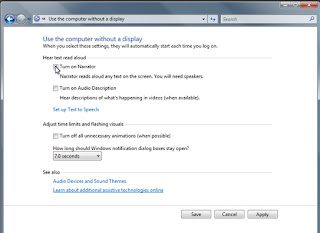
- Select "Save"


Emotiv EPOC "brain-computer interface device", a neuroheadset that allows the wearer to play videogames simply by thinking has been unveiled at the Game Developers Conference in San Francisco and will go on sale in late 2008.
The Emotiv EPOC has 14 neurosensors that branch off it like fingers sitting on the sides of the temple and top of the head.
The device can detect conscious thoughts, areas of brain activity, facial expressions and even some emotions such as frustration, shock and anger, and will cost about $US300 when it is released.
I can't wait to see it!!!
The Emotiv EPOC has 14 neurosensors that branch off it like fingers sitting on the sides of the temple and top of the head.
The device can detect conscious thoughts, areas of brain activity, facial expressions and even some emotions such as frustration, shock and anger, and will cost about $US300 when it is released.
I can't wait to see it!!!
 Read More......
What is your current browser homepage?
A lot of people use MSN as default homepage, which is set by Microsoft when you install Internet Explorer. The users of other browsers might probably be using default homepages most of the time. Or the manufacturers’ sites such as Dell, etc. Is that the most efficient way?
I personally believe there are many downsides with using default homepages. First of all, when you open your browser, your default homepage may not be the page you want to go. You will have to type the address (or choose from Favorites list) for your destination page. It takes time – at least a few seconds of your precious time.
Secondly, it takes a while to download and display your homepage especially if you’re using slow connection or the destination sever is busy. There goes your precious time again every time you open a browser.
Some of you might choose ‘Blank’ homepage to work around. But in that case the “Home” button from your browsers becomes useless as you’ll see only a blank page if you click it.
Why don’t you create a HTML page for your own homepage? You can put a list of all the sites you visit daily there such as news, banks, schools, emails, blogs, etc. You can also categorise the links. All you need is a program like Front Page. You still can use Word if you don’t have Front Page (just save it as Web Page instead of doc). Here are the steps.
- Create the list of all the sites you visit daily in Front Page with the links.
- Save it to somewhere safe. C:\ will do. Let’s say the file name is myhomepage.html .
- Open myhomepage.html and choose Tools > Internet Options > General. Click “Use Current”.
Now you’ll have your own customised homepage that is faster to load and more useful than most of the default homepages.
Let me know how it is.
Note: You can put Wikipedia search box, etc too. Read More......
By default, Windows XP Start menu has got some delay to respond your cursor. Here is a simple registry tweak to remove (or reduce) the delay.
- Click "Start"
- Choose "Run"
- Type "regedit" without the quotes
- Go to the registry location "HKEY_CURRENT_USER\Control Panel\Desktop" and find "MenuShowDelay". (If it doesn't exist, create new with this value name and String data type.)
- Open it and change value data to "0" instead of default value "400". (You can choose 100 if you don't want it to respond too fast)
- Reboot your PC
Note: You should keep a backup of your registry before doing any changes.
Fresh from my shower, I stand in front of the mirror complaining to my husband that my breasts are too small.
Instead of characteristically telling me it's not so, he uncharacteristically comes up with a suggestion.
"If you want your breasts to grow, then every day take a piece of toilet paper and rub it between them for a few seconds".
Willing to try anything, I fetch a piece of toilet paper and stand in front of the mirror, rubbing it between my breasts.
"How long will this take?" I asked.
"They will grow larger over a period of years," my husband replies.
I stopped. "Do you really think rubbing a piece of toilet paper between my breasts every day will make my breasts larger over the years?"
Without missing a beat he says, "Worked for your butt, didn't it?"
He's still alive, and with a great deal of therapy, he may even walk again.
Although he will probably continue to take his meals through a straw.
I am sure most of you must have used Skype at least once. But I think many Skype users do not use Skype with a cordless phone. Here is a technique I’ve been using with Skype for more than a year. Try it and it can save you a lot, and you don’t have to sit in front of your PC any more.
You only need two things: a USB Skype VoIP to PSTN (RJ11) adapter (shown in picture) and a cordless phone. It doesn’t cost a lot. I paid less than $60 for both.


Here are some of the benefits you can get (although some of them may differ in each model).
Important: Check system requirements carefully before you buy!!!
Subscribe to:
Comments (Atom)


